What does a photo metadata report show?
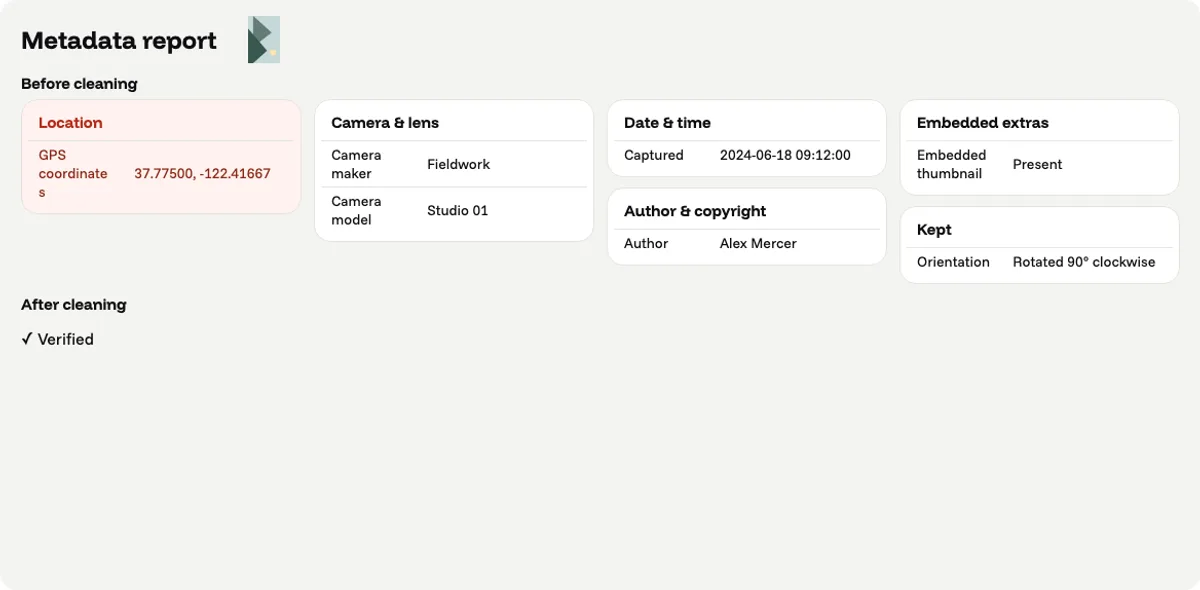
A synthetic photograph includes location and camera fields so you can inspect the difference without using a personal file.
How do I remove EXIF data from photos?
The metadata cleaner removes hidden information such as camera details and GPS coordinates from a photo. Choose a file, compare its original and cleaned metadata reports and download the cleaned copy.
Choose a photo
Start with the original camera file if you have it. A messaging app may already have stripped the fields you expected to see. Select multiple photos to clean a batch; choose Clean photos to start and Download ZIP to save verified files.
Read the grouped report
Before cleaning groups available fields under headings such as Location, Camera & lens, and Date & time. Kept shows orientation when present.
Save the cleaned file
Choose Remove metadata & download. After cleaning shows how many report items were removed and whether the saved bytes passed verification.
A file can contain GPS latitude and longitude, a capture date, camera make and model, lens information, a serial number or the name of the editing software. An author or copyright field can contain a personal name. An embedded thumbnail can show another version of the image. What you actually see in the report depends on what the original file contains.
Coordinates appear as numbers. Showing them does not require sending a location to a map provider. Read the remaining groups too. EXIF is one metadata format, but software can also write XMP, IPTC or ordinary text chunks. Removing a single location tag from an EXIF record would leave these other possible sources of personal information in place.
Does stripping metadata reduce image quality?
To remove EXIF data from a supported JPEG, the cleaner works through the file’s marker segments. It removes descriptive metadata and comments while keeping the compressed picture data. It also drops material appended after the end of the JPEG, which can include a motion-photo video. If a file relied on an accompanying image or appended enhancement, keep the original for your own archive.
The cleaner preserves the ICC color profile and the Adobe color marker used for rendering. A camera can also store its picture sideways and use an orientation tag to tell viewers which way is up. Where necessary the cleaner writes a minimal orientation record. Seeing orientation in a cleaned JPEG is consistent with removing personal metadata. You can check that the displayed picture still faces the same direction as the original.
PNG files can carry plain or compressed text, an EXIF chunk and time information. Cleaning removes those descriptive chunks and data after the image end. It keeps information needed for presentation, including transparency, color information and animation chunks. WebP has its own container. Its EXIF and XMP chunks can be removed while preserving the encoded picture and updating the container size and flags. For PNG and WebP files with rotation or mirroring, the editor re-encodes the displayed pixels at the correct orientation. It also re-encodes decoded formats outside JPEG, PNG and WebP.
How do I check EXIF data is gone?
Compare the before and after reports. The cleaner reads the resulting bytes again before reporting a clean result. Look for the personal fields you saw in the input and confirm that the output report no longer lists them. Save the cleaned copy somewhere distinguishable from the original. For a second check, open the saved file itself in the cleaner. This also catches a common sharing mistake: selecting the original from two nearly identical thumbnails.
Open the cleaned photograph in your usual viewer as well. Check appearance, orientation and transparency where relevant. A clean metadata report says nothing about personal information written into the picture itself. A boarding pass on a desk, a reflection of a house number or a name printed on a uniform still consists of ordinary visible pixels. Use the image redaction tool to cover those details before providing a copy to someone else.
What else can a photo file reveal?
Can I remove EXIF data from a HEIC file?
Yes. The editor reads the photo on your device and re-encodes the primary image. It verifies the exported file before download. Keep the original if you need its format or camera-specific features.
Why do two photographs from the same camera show different fields?
Camera settings and later processing affect what is present. An image exported through another app may already have lost its GPS fields while retaining software or author information. Read the input report for the exact file you are sharing.
Will cleaning change a revealing filename?
Single downloads use a neutral filename by default. Choose Keep filename to retain the original stem. For a batch, the archive contains numbered files such as photo-001.jpg.
Are GPS coordinates sent to Maskimg?
No. Coordinates are read from the file on your device. You can load the cleaner, disconnect from the network and inspect a photo without sharing either the photo or its location.
Does cleaning change the file size?
The file can become smaller when thumbnails, comments or an appended video are removed. For supported JPEGs and PNG or WebP files with normal orientation, the cleaner preserves the encoded image data and pixel dimensions.
Can I remove metadata from several photos at once?
Yes. Select or drop several image files together, then choose Clean photos. The report shows which files passed verification. Download ZIP saves those files with numbered names and leaves the original photos untouched.