How does mosaic differ from blur?
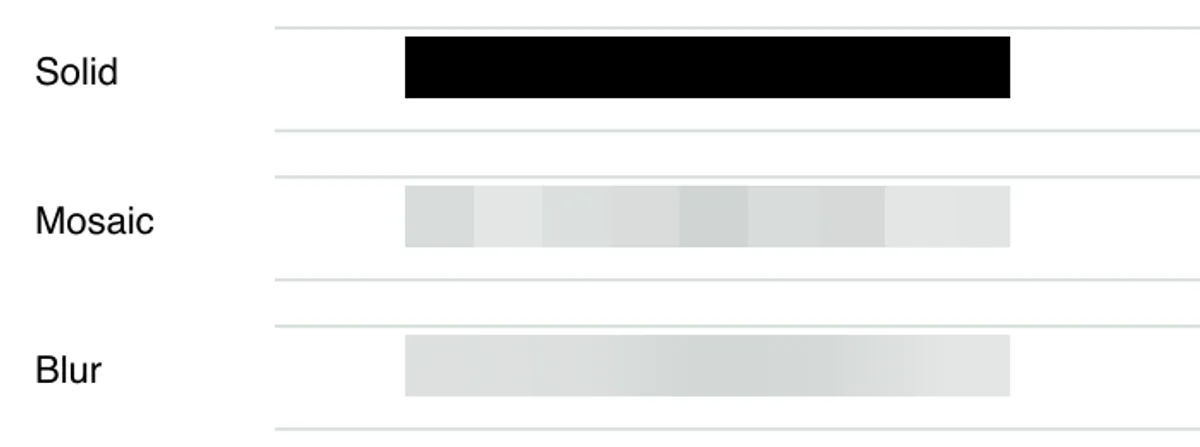
Compare the rectangular grid of a mosaic with a continuous blur and an opaque cover.
How do I pixelate an image?
A mosaic groups nearby pixels into colored blocks. Open your picture, draw over the area you want to pixelate and save a copy with the block pattern in place.
Select the object
Look for a shape that should remain recognizable in outline while losing fine detail, such as a background sign in a tutorial.
Draw a mosaic
Drag around the object. Give separate details their own rectangles so changing one pattern leaves the other in place.
Choose the output
Save as PNG for crisp block boundaries or JPEG for a photographic scene. Copy image also gives you a PNG where supported.
Look at the style comparison above. Solid ink creates a uniform patch. Blur softens transitions between colors. Mosaic keeps hard boundaries between neighboring blocks. Those blocks still communicate the broad shapes and colors of the original. If someone knows the possible values of a short label, that pattern may provide clues. For a private message, code or account number, select a solid mask instead.
How can I adjust the mosaic area?
Use the whole-picture view first. A mosaic on a tiny corner may be almost invisible in a thumbnail, while a large mosaic in the middle becomes a focal point. Trace a rectangle around the distracting element and leave a small margin where its outline blends into the background. The mosaic treatment scales to the selected area. Review it again after resizing because the arrangement of blocks can look different at the new size.
A colored outline or distinctive symbol just outside the rectangle can remain perfectly sharp. Select the region and move its nearest handle outward until the intended feature is inside. If the rectangle also covers a useful caption, shorten it on that side. Use arrow keys to nudge the selected region when moving the whole rectangle by dragging feels too coarse.
Two areas on opposite sides of the picture are usually easier to handle independently. Draw a region over each, then use the region list to select them in turn. The list also allows numeric adjustments to position and dimensions. Change one region to Solid if you discover private material while leaving the decorative mosaic elsewhere. Undo and redo let you revisit the previous arrangement during the same editing session.
What does pixelation hide?
Pay particular attention to anything the blocks were intended to hide. A uniform logo color, familiar silhouette or row of characters can still be recognizable from context. Use the solid redaction tool when replacing private pixels matters. If your intended result is a quieter background without a visible grid, blur part of the image instead. You can compare the styles in the editor before committing to an export.
Open several pictures together to keep them in a strip. Each picture keeps its own masks and undo history. Mark the finished pictures as checked to download them in one ZIP.
Can I edit or undo a mosaic?
Can I pixelate image regions on a phone?
Yes. Open the picture, draw a region with touch and zoom in if the area is too small to position accurately. Use the region list to adjust numbers when a finger obscures the edge you are trying to align.
Does pixelating a label make its wording secret?
A mosaic retains information about the distribution of color and brightness. Short strings, numbers or predictable wording can sometimes be recovered. Cover the full label with solid color if its contents must be withheld, then check the context around it.
Can a recipient remove the mosaic layer?
The downloaded file contains the exported pixels, with the mosaic baked into the picture. There is no separate mosaic object for a recipient to move. Keep the source picture privately if you need to export another version with different regions later.
Does the mosaic tool store a copy of my image?
The editor holds the picture in memory during the session. Try opening the mosaic editor, going offline and choosing a picture. You can apply the mosaic and download it while disconnected.
Which images can I turn into a mosaic?
Open a PNG, JPEG, WebP or HEIC photo directly. A HEIC photo exports as JPEG by default. You can also choose PNG or WebP.